
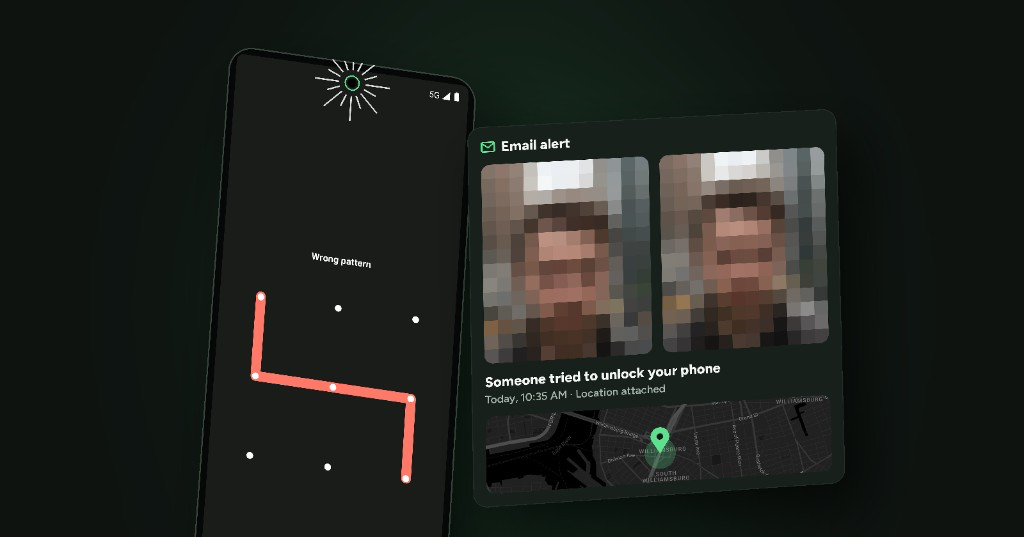
Maybe your phone was moved while you were away. Maybe you saw a “Try again in 30 seconds” message you didn’t cause. Or maybe you just want to know if someone has been trying to get into your phone.
Here’s the short answer:
- Android doesn’t keep a record of failed unlock attempts, and it doesn’t take a photo of the person who made them.
- You can add this with an app that takes a picture when someone enters the wrong PIN, pattern or password. That photo is often called an intruder selfie.
- CrookCatcher does exactly this, for free, and emails you the photo together with the location.
Can Android show who tried to unlock your phone?
Not by default. When someone enters the wrong PIN, pattern or password, Android simply rejects it. After several wrong attempts it makes the person wait before trying again, but it doesn’t save a log you can check later, and it never uses the camera.
Some phone manufacturers include a similar “intruder photo” option in their own app lock. These usually only protect individual apps, not the lock screen itself, so they won’t catch someone trying to get into your phone in the first place.
To see who tried to unlock your phone, you need an app that watches the lock screen and reacts to failed attempts.
How to take a photo of anyone who enters the wrong password
This is how to set it up with CrookCatcher. It takes a few minutes, and you don’t need to create an account.
- Install CrookCatcher from Google Play.
- Allow Device Administrator. This is the Android permission that lets an app notice when an unlock attempt fails. CrookCatcher uses it only for that.
- Allow camera and location access, so it can take the photo and record where it happened.
- Connect a Gmail account for the alert emails. CrookCatcher can only send emails from it; it can’t read, delete or change anything in your inbox. You can create a separate Gmail account just for this, or skip email entirely and only keep the photos on your phone.
- Test it. Lock your phone, enter a wrong PIN on purpose, then unlock it. You should see your own (probably confused) face in the app and in your inbox. 😄
That’s it. From now on, every time someone enters the wrong PIN, pattern or password, CrookCatcher silently does its job in the background.
What you get when someone tries to unlock your phone
Each time an unlock attempt fails, you get:
- A photo from the front camera of whoever was holding the phone
- The GPS location and an estimated address of where it happened
- The time of the attempt
- An email alert with all of the above, so you have it even if the phone is gone
All photos are also saved in the app, where you can browse every attempt with its time and location.
With CrookCatcher Pro, you can also record a video with sound, take a photo of the surroundings with the back camera, upload everything to Google Drive automatically, and catch people even when they guess your PIN correctly after a failed attempt (break-in detection).
Other signs someone has been using your phone
A photo is the clearest proof, but these can also tell you someone has been on your phone:
- Recently opened apps you didn’t use (open the app switcher)
- Messages or notifications marked as read that you haven’t seen
- Google account activity you don’t recognize, at myactivity.google.com
- The phone is in a different place or position than you left it
If you notice any of these, setting up an intruder selfie app is the easiest way to find out who it is next time.
What to do if it was a thief
If the photos show a stranger, or your phone is missing:
- Don’t confront the person yourself. Your safety matters more than the phone.
- Report it to the police and include the photos, time and location from the alert email.
- Use Google’s Find Hub to locate, lock or erase the phone.
- Contact your carrier to block the SIM and the phone’s IMEI.
To make your phone harder to steal in the first place, read our guide to the top 5 Android settings to secure your phone against theft.
Only use it on your own phone
CrookCatcher is made to protect your phone. Only install it on a device you own. Secretly monitoring someone else’s phone isn’t what it’s for, and in many countries it’s illegal.
Is CrookCatcher free?
Yes, the most important features are free: the intruder photo, the location and the email alert. CrookCatcher Pro adds video, the back camera, Google Drive backup, break-in detection, an alarm, a fake home screen and more. The price depends on your country, so check the app to see it. Here’s the full comparison:
Free
PRO
Take pictures
Take a picture when a wrong password, pin or pattern is entered.

Obtain location
Locate phone with GPS when picture is taken.
Send alert email
Receive pictures and location by email.
Video capture
With video capture you are more likely to get a good view of the intruder and possibly identify their voice and surroundings.

Google Drive upload
Upload pictures and videos directly to your Google Drive to allow easy access to files on any device.
Back facing camera
Identify the surroundings of the intruder with pictures from the back facing camera.
Alert Message
Show a custom message on the lock screen, when a picture is taken. You could tell the crook to return your phone, or you'll show their picture to the police.
Alarm sound
Play a custom alarm sound at full volume when a wrong password is entered.
Fake home screen
Show a fake home screen when a wrong password is entered. Thieves will think they unlocked your phone. When they start tapping on the screen, more pictures will be taken.
App lock
Lock access to CrookCatcher with a pattern code.
Disguise app
Change the app icon and name to make it look like a file explorer app, so intruders won't find out you have CrookCatcher installed.
Break in detection
Take a picture and send alert email if the crook guesses the right password after having failed.
Custom email subject
Change alert email subject text, to avoid crooks seeing revealing notifications.
Hide notifications
Only show alert notifications on device after successful unlock. This way crooks won't know they got caught.
No ads
Enjoy an ad-free app and support the development of CrookCatcher.
Frequently Asked Questions
Q: Does it work with a pattern lock, PIN and password?
A: Yes. CrookCatcher reacts to a wrong PIN, pattern or password. Failed fingerprint or face unlock attempts don’t trigger it, and it doesn’t work with pop-up cameras.
Q: Will the person know they were photographed?
A: CrookCatcher works in the background without showing a camera preview. On Android 13 and newer, Android shows a small indicator while the camera is in use, which is a system feature apps can’t hide.
Q: Do I need an account?
A: No. There’s no registration. You only connect a Gmail account if you want alert emails.
Q: Who can see my photos?
A: Only you. Alerts are sent from your own Gmail account, and the developer never sees your photos. Read more in the privacy policy.
Q: Does it drain the battery?
A: No. CrookCatcher only activates when an unlock attempt fails, so battery usage is minimal.
Q: Is there an iPhone version?
A: No. iPhones don’t allow apps to detect failed unlock attempts, so CrookCatcher is available for Android only.
Q: Does it work after restarting my phone?
A: Yes, after you unlock your phone once following a restart. Until then, Android doesn’t allow apps to react to unlock attempts.
Got more questions? Check out the FAQ.

